
Mixpanel
This guide describes how to add and configure the Mixpanel integration.
Mixpanel is a powerful mobile analytics service. Send Apphud subscription and purchase events to Mixpanel, analyze user behavior, and make decisions based on real revenue data.
Important NoteMake sure that Mixpanel Collection of common mobile events is disabled, otherwise Mixpanel's automatic in-app purchase events will double-count revenue. See Default Mobile Events Collection for details.
How to Add Integration?
Step 1 - Install the SDKs
- Install Apphud SDK.
- Install Mixpanel SDK.
- Match User IDs between Mixpanel and Apphud. See below.
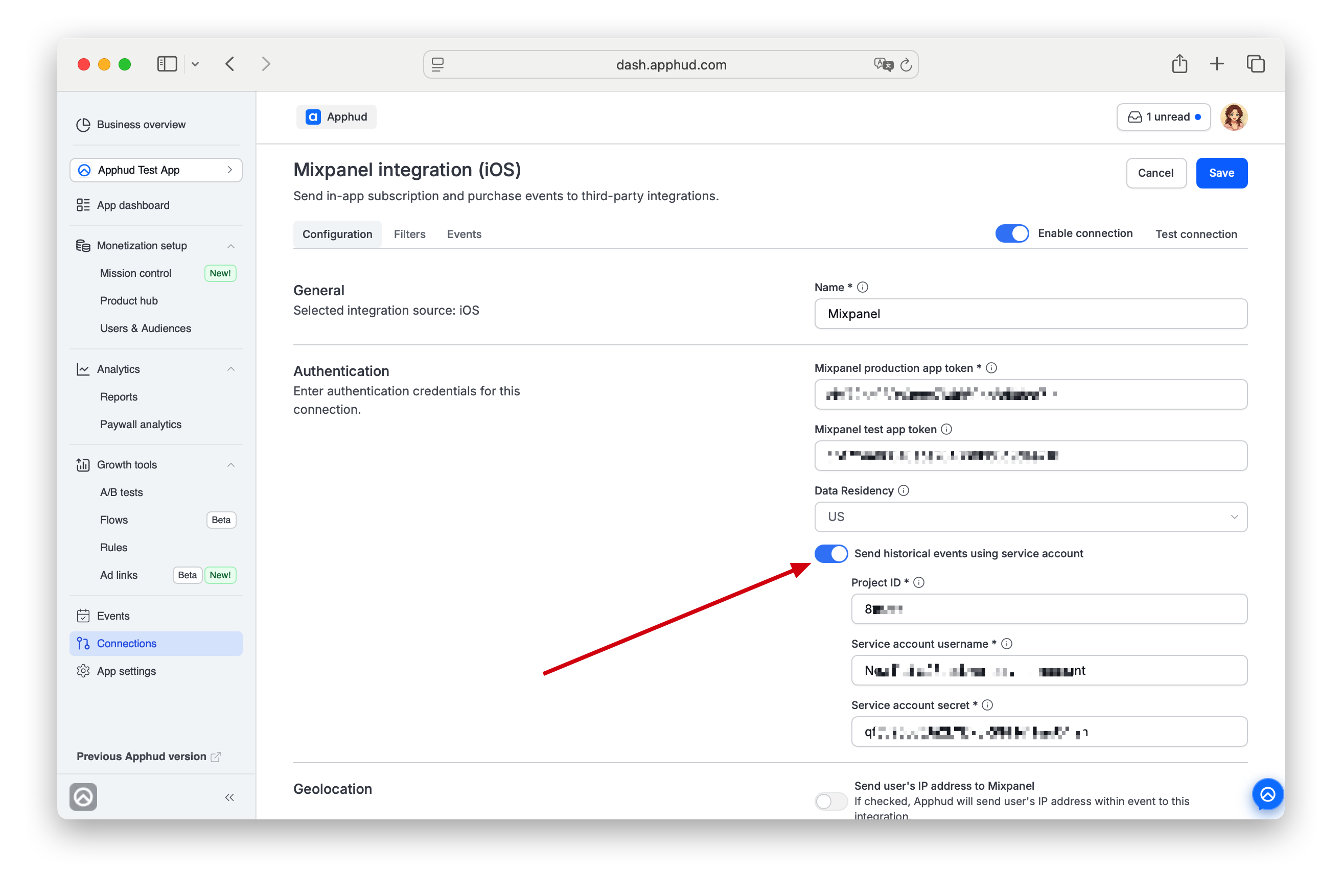
- (Optional) Enable Service credentials for importing historical events.
Step 2 - Preparations in Mixpanel
In Mixpanel, disable Collection of common mobile events so Mixpanel's automatic In-App purchase events don't conflict with Apphud's. Otherwise, if a user starts a trial period, Mixpanel will consider this as revenue. More details: Default Mobile Events Collection.
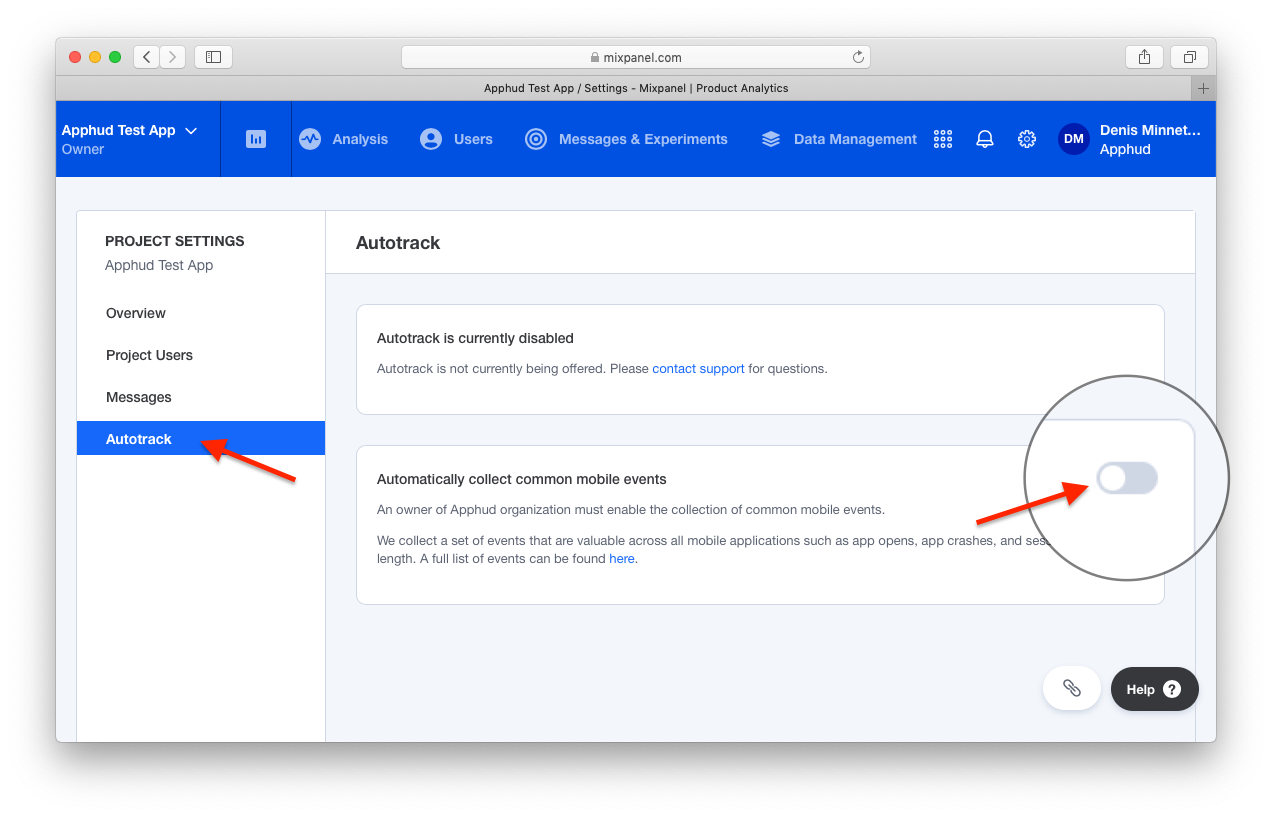
Get your Mixpanel Token from project settings — the same token you use in your app.
Step 3 - Authentication
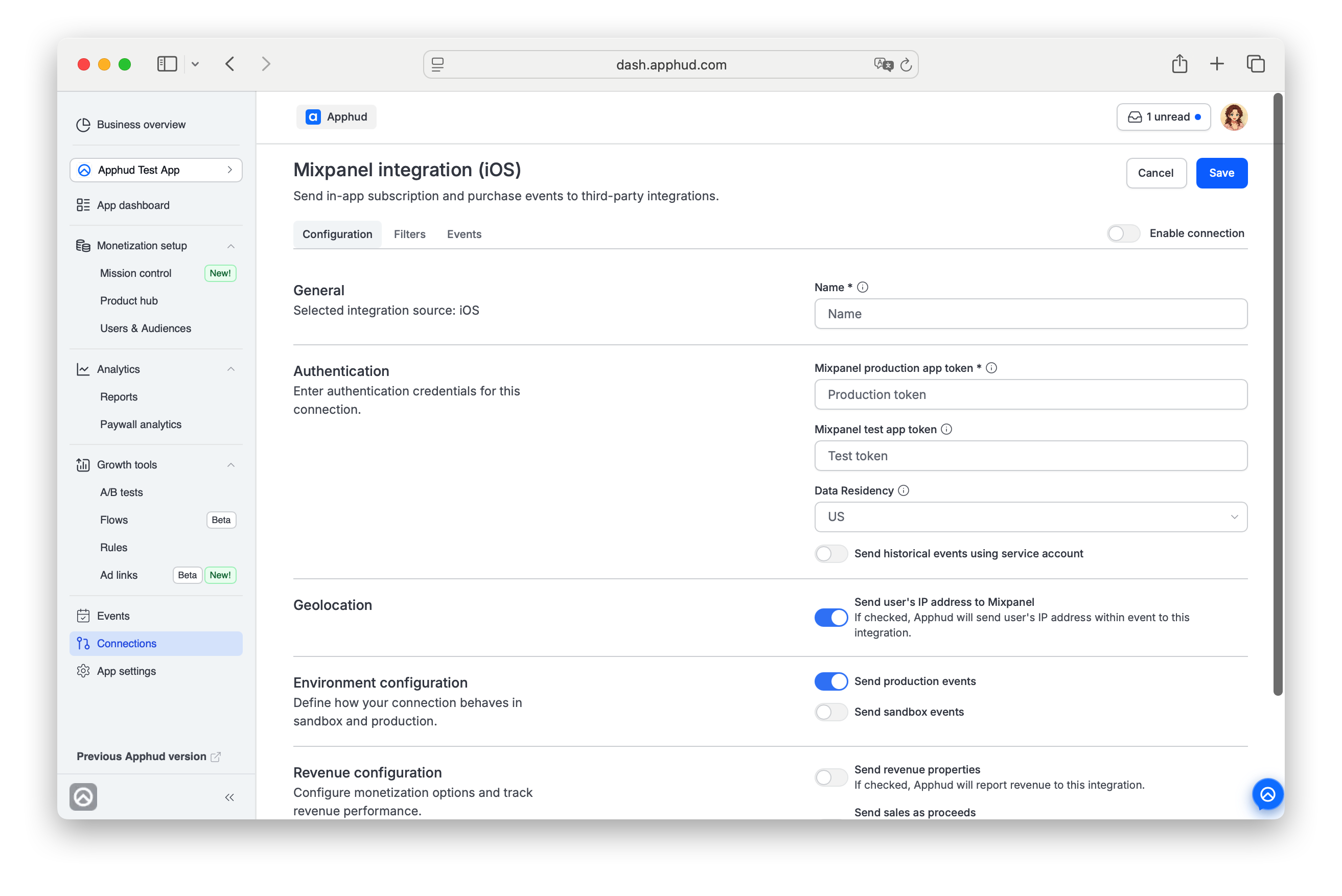
In Apphud, open Connections → Integrations (the All or Analytics tab). Click Add Connection for Mixpanel and choose a Source in the pop-up.
Enter connection Name.
Enter authentication data:
- Mixpanel production app token (required) — copied from Mixpanel project settings.
- Mixpanel test app token (optional) — if you maintain a separate Mixpanel test project.
Data Residency
Choose the region of your Mixpanel project: US, EU, or India. Apphud sends events directly to the matching Mixpanel ingestion endpoint:
| Data Residency | Ingestion endpoint |
|---|---|
| US | api.mixpanel.com |
| EU | api-eu.mixpanel.com |
| India | api-in.mixpanel.com |
Pick EU or India only if your Mixpanel project was created with EU / India data residency. If you're not sure, check your project settings in Mixpanel — see Mixpanel's EU Residency guide.
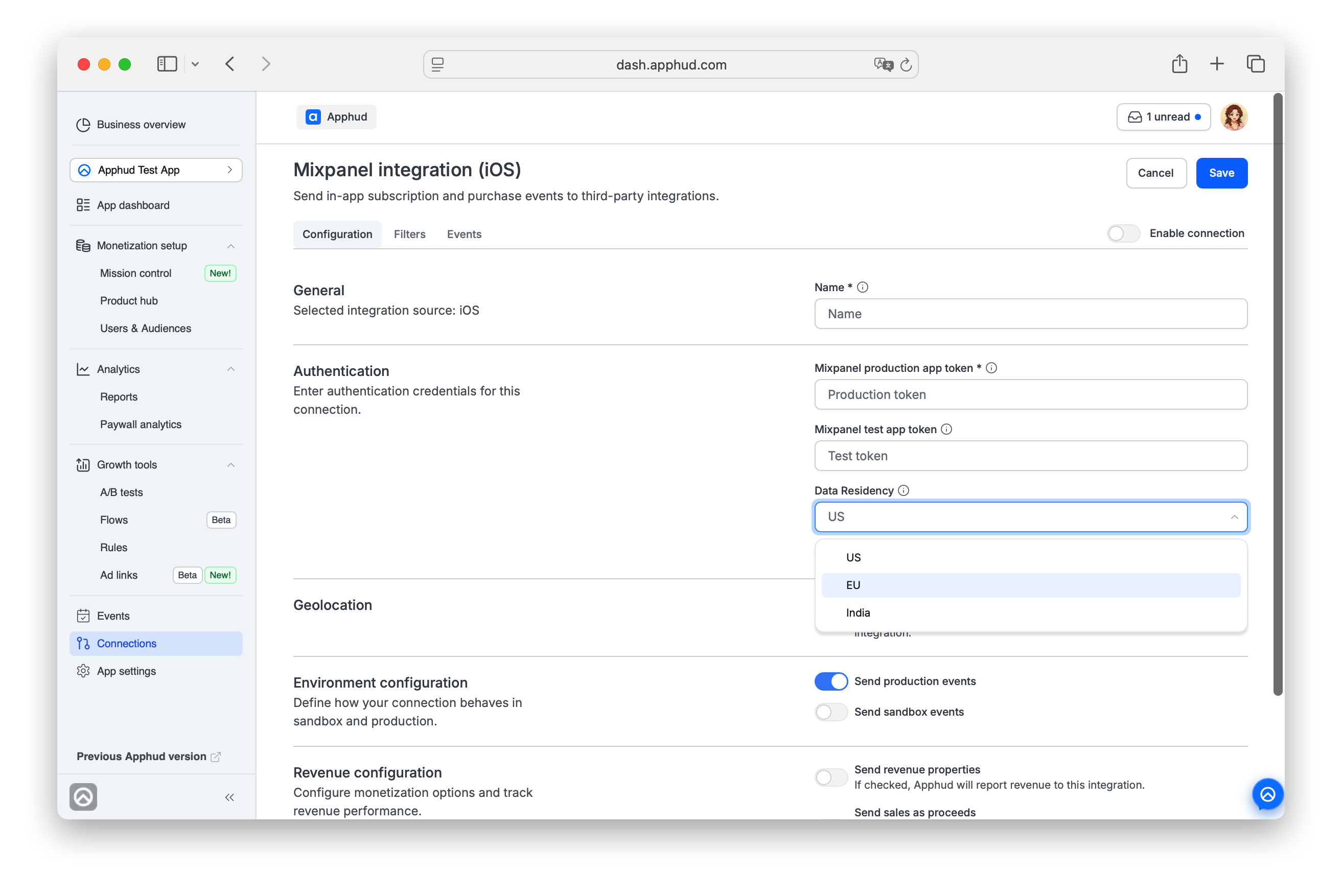
EU / India projects must select the correct regionMixpanel is sunsetting its legacy US→EU data forwarding in July 2026. After that, events for EU/India Mixpanel projects sent to the US endpoint will be dropped. If your Mixpanel project uses EU or India data residency, set Data Residency accordingly and click Save.
Integrations created before this option was added default to US. If your project is EU/India, update this field to avoid data loss. See Mixpanel's deprecation notice.
Importing Historical Events
You can specify Service credentials for importing historical events (for example, renewals that occurred before Apphud SDK integration). Provide Project ID and Service Account credentials. See Mixpanel Service Accounts for details.
Step 4 - Additional configuration
Geolocation
If Send user's IP address to Mixpanel is checked, Apphud will send user's IP address within event to this integration.
Send events from anonymous users
OFF by default. Turn it on to also forward events from anonymous users — customers Apphud auto-created from an App Store or Google Play event before your SDK identified them (the SDK isn't integrated yet, or the app hasn't been updated). See the Integrations overview.
Revenue
Mixpanel-specific revenue option:
- Send Revenue properties — when ON, Apphud reports revenue to Mixpanel as Mixpanel's built-in Revenue parameter, converted to USD. Off by default. See Events with Revenue parameter below for which events support this.
Generic Environment and Send sales as proceeds settings are described once on Integrations overview → Configuration tab.
Step 5 - Set up filters (optional)
Navigate to Filters tab. Set up filters if needed as described on Integrations overview → Filters tab.
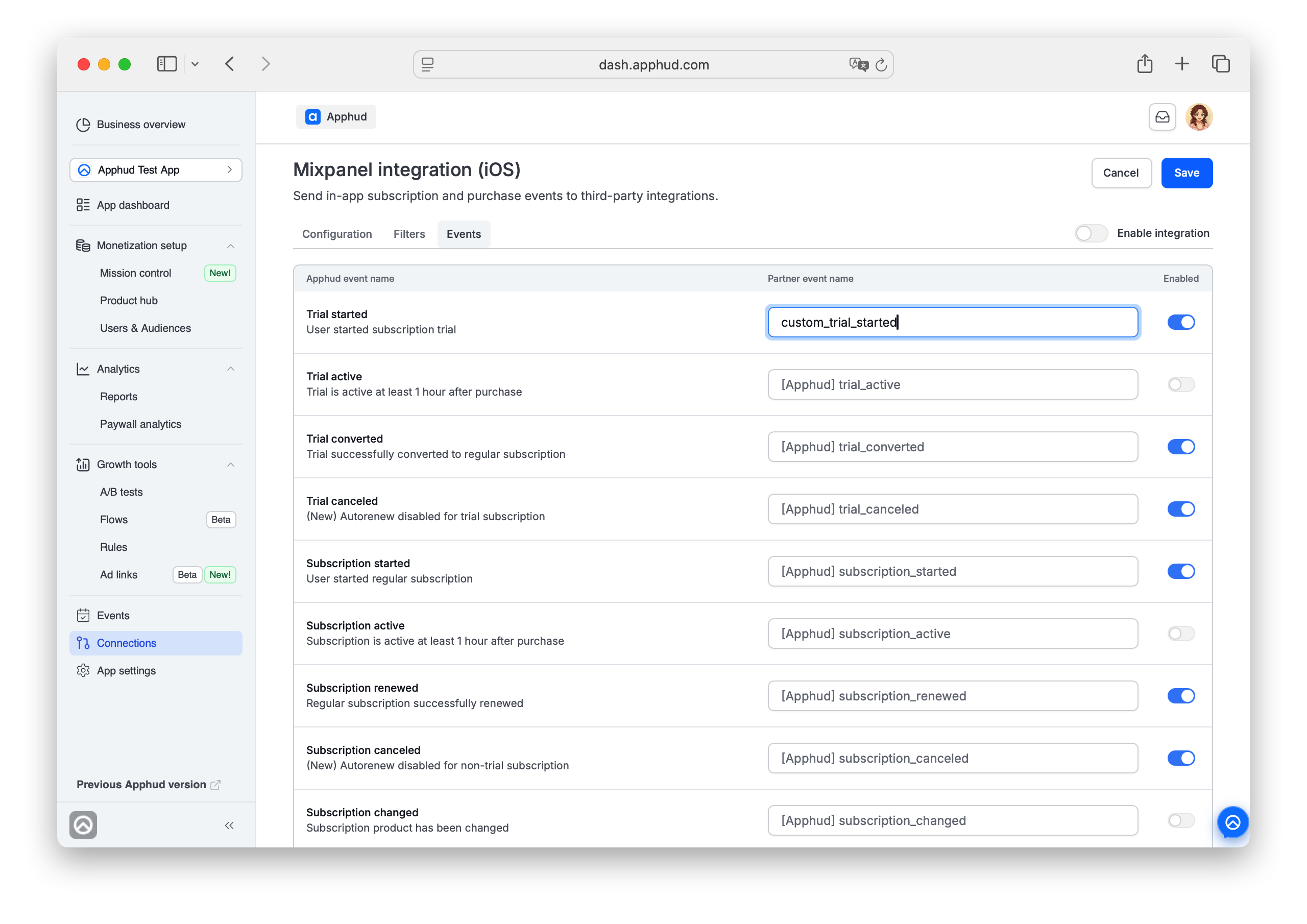
Step 6 - Set up Events list
Open the Events tab of the configuration. You can enter custom event names or disable some.
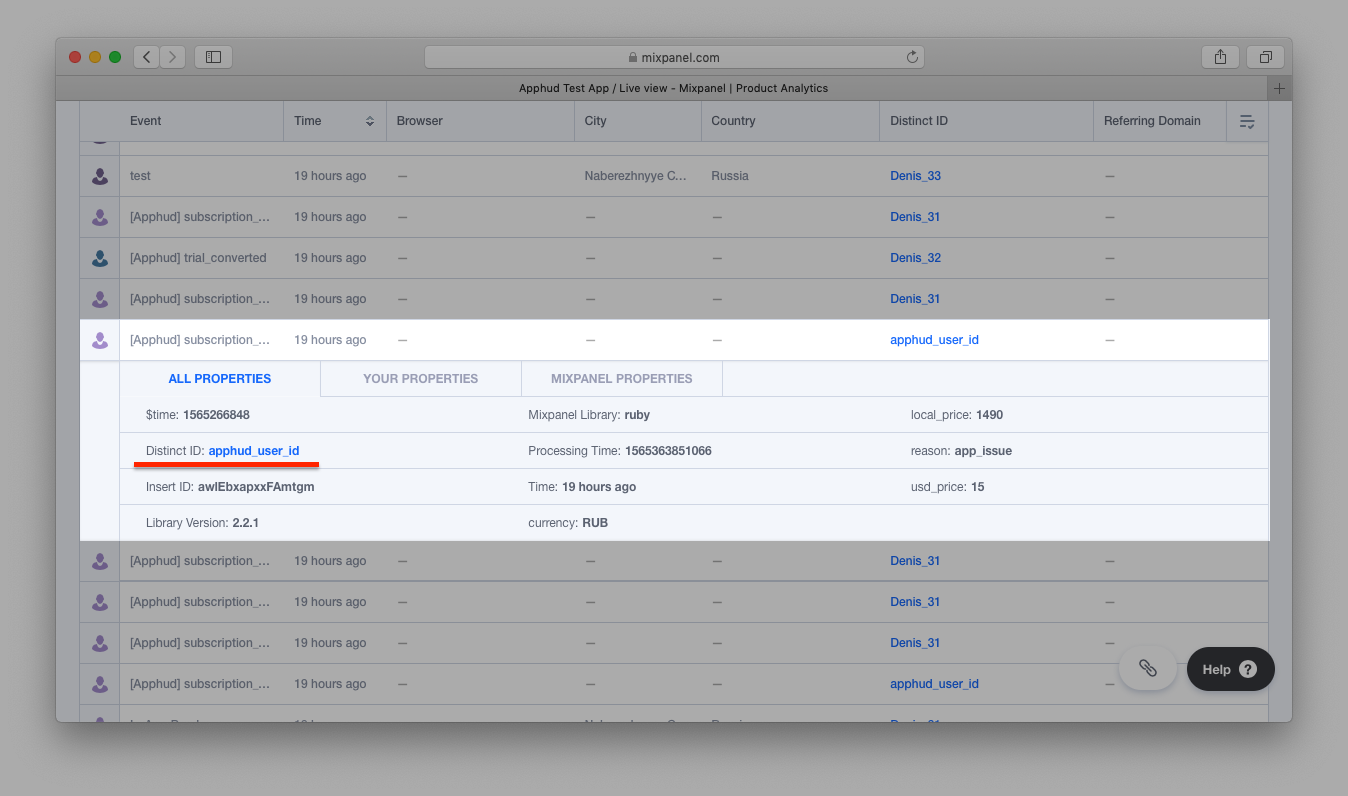
Step 7 - Test connection (optional)
Save the connection.
For the general Test connection flow see Integrations overview → Test connection.
A new user appears in Mixpanel's Live view report:
Step 8 - Enable and save connection
Once you confirmed the connection works — Enable integration and Save.
Match user IDs
Initialize both SDKs and match Apphud's User ID to Mixpanel's distinctId:
func application(_ application: UIApplication, didFinishLaunchingWithOptions launchOptions: [UIApplication.LaunchOptionsKey: Any]?) -> Bool {

    Apphud.start(apiKey: "YOUR_API_KEY")
    Apphud.setDelegate(self)

    Mixpanel.initialize(token: mixpanel_token)
    Mixpanel.mainInstance().identify(distinctId: Apphud.userID())

    return true
}

func apphudDidChangeUserID(_ userID: String) {
    // Match again
    Mixpanel.mainInstance().identify(distinctId: Apphud.userID())
}
- (BOOL)application:(UIApplication *)application didFinishLaunchingWithOptions:(NSDictionary *)launchOptions {
[Apphud startWithApiKey:@"APPHUD_API_KEY" userID:nil];
[Apphud setDelegate:self];
[Mixpanel sharedInstanceWithToken:@"MIXPANEL_TOKEN"];
[Mixpanel.sharedInstance identify:Apphud.userID];
return YES;
}
- (void)apphudDidChangeUserID:(NSString *)userID {
[Mixpanel.sharedInstance identify:Apphud.userID];
}Apphud.start(apiKey: "YOUR_API_KEY")
val mixpanel = MixpanelAPI.getInstance(context, MIXPANEL_TOKEN)
mixpanel.identify(Apphud.userID())Apphud.start(apiKey: "YOUR_API_KEY");
MixpanelAPI mixpanel = MixpanelAPI.getInstance(context, MIXPANEL_TOKEN);
mixpanel.identify(Apphud.userID());Future<void> _initMixpanel() async {
final userId = await Apphud.userID();
_mixpanel = await Mixpanel.init(
'insert_your_token_key_here',
trackAutomaticEvents: false,
);
await _mixpanel?.identify(userId);
}
// implement Apphud Listener methods
@override
Future<void> apphudDidChangeUserID(String userId) async {
printAsJson('ApphudListener.apphudDidChangeUserID', userId);
await _mixpanel?.identify(userId);
}Events with Revenue parameter
The following events can be optionally sent to Mixpanel with Mixpanel's built-in Revenue parameter converted to USD when Send Revenue properties to Mixpanel is enabled in Step 4:
[Apphud] trial_converted[Apphud] intro_started[Apphud] intro_renewed[Apphud] intro_converted[Apphud] intro_refunded[Apphud] subscription_started[Apphud] subscription_renewed[Apphud] subscription_refunded[Apphud] promo_started[Apphud] promo_renewed[Apphud] promo_converted[Apphud] promo_refunded
Events Cheat Sheet
This is a list of all possible events and their parameters that are being sent to Mixpanel.
Trial
Trial period started
Default event name: [Apphud] trial_started
Parameters:
product_id: Stringunit: Stringunits_count: Integer
Successful conversion from trial period to regular subscription
Default event name: [Apphud] trial_converted
Parameters:
product_id: Stringlocal_price: Floatcurrency: Stringusd_price: Float
Failed conversion from trial period to regular subscription
Default event name: [Apphud] trial_expired
Parameters:
product_id: Stringreason: String
Cancellations
Trial Canceled
Default event name: [Apphud] trial_canceled
Parameters:
product_id: String
Subscription Canceled
Default event name: [Apphud] subscription_canceled
Parameters:
product_id: String
Autorenew disabled (Deprecated)
Default event name: [Apphud] autorenew_disabled
Parameters:
product_id: String
Autorenew enabled
Default event name: [Apphud] autorenew_enabled
Parameters:
product_id: String
Introductory Offer
Introductory offer started
Default event name: [Apphud] intro_started
Parameters:
product_id: Stringlocal_price: Floatcurrency: Stringusd_price: Floatoffer_type: Stringunit: Stringunits_count: Integer
Introductory offer renewed
Default event name: [Apphud] intro_renewed
Parameters:
product_id: Stringlocal_price: Floatcurrency: Stringusd_price: Floatoffer_type: Stringunit: Stringunits_count: Integer
Successful conversion from introductory offer to a regular subscription
Default event name: [Apphud] intro_converted
Parameters:
product_id: Stringlocal_price: Floatcurrency: Stringusd_price: Floatoffer_type: String
Failed conversion from introductory offer to regular subscription or failed to renew
Default event name: [Apphud] intro_expired
Parameters:
product_id: Stringreason: Stringoffer_type: String
Refund during the introductory offer
Default event name: [Apphud] intro_refunded
Parameters:
product_id: Stringlocal_price: Floatcurrency: Stringusd_price: Floatreason: Stringoffer_type: String
Regular
Subscription started
Default event name: [Apphud] subscription_started
Parameters:
product_id: Stringlocal_price: Floatcurrency: Stringusd_price: Float
Subscription renewed
Default event name: [Apphud] subscription_renewed
Parameters:
product_id: Stringlocal_price: Floatcurrency: Stringusd_price: Float
Subscription expired
Default event name: [Apphud] subscription_expired
Parameters:
product_id: Stringreason: String
Subscription refunded
Default event name: [Apphud] subscription_refunded
Parameters:
product_id: Stringlocal_price: Floatcurrency: Stringusd_price: Floatreason: String
Promo Offer
Promotional offer started
Default event name: [Apphud] promo_started
Parameters:
product_id: Stringoffer_id: Stringlocal_price: Floatcurrency: Stringusd_price: Floatoffer_type: Stringunit: Stringunits_count: Integer
Promotional offer renewed
Default event name: [Apphud] promo_renewed
Parameters:
product_id: Stringoffer_id: Stringlocal_price: Floatcurrency: Stringusd_price: Floatoffer_type: Stringunit: Stringunits_count: Integer
Successful conversion from promotional offer to a regular subscription
Default event name: [Apphud] promo_converted
Parameters:
product_id: Stringoffer_id: Stringlocal_price: Floatcurrency: Stringusd_price: Floatoffer_type: String
Failed conversion from promotional offer to regular subscription or failed to renew
Default event name: [Apphud] promo_expired
Parameters:
product_id: Stringoffer_id: Stringreason: Stringoffer_type: String
Refund during the promotional offer
Default event name: [Apphud] promo_refunded
Parameters:
product_id: Stringoffer_id: Stringlocal_price: Floatcurrency: Stringusd_price: Floatreason: Stringoffer_type: String
Other Events
Non-renewing purchase
Default event name: [Apphud] non_renewing_purchase
Parameters:
product_id: Stringlocal_price: Floatcurrency: Stringusd_price: Float
Non-renewing purchase refunded
Default event name: [Apphud] non_renewing_refunded
Parameters:
product_id: Stringlocal_price: Floatcurrency: Stringusd_price: Floatreason: String
Billing issue
Default event name: [Apphud] billing_issue
Parameters:
product_id: String
Billing issue Resolved
Default event name: [Apphud] billing_issue_resolved
Parameters:
product_id: String
User properties
In the table below are the user properties sent to Mixpanel.
NoteMore information about user properties can be found here.
| Parameter | Type |
|---|---|
[Apphud] status-group_name | String |
[Apphud] autorenew-group_name | Boolean |
[Apphud] total_spent | Float |
[Apphud] paying | Boolean |
[Apphud] payments_count | Integer |
Updated 3 months ago