
PostHog
This guide describes how to add and configure PostHog integration.
PostHog is a product analytics platform that helps teams understand user behavior, analyze product usage, build funnels, and measure retention. Apphud sends subscription lifecycle events and revenue data to PostHog so you can combine monetization metrics with product analytics in a single environment — events are linked to your existing user profiles in PostHog in real time, with no backend implementation required.
What This Integration Enables
This integration connects product behavior with monetization and helps you understand how user actions impact subscriptions, retention, churn, and revenue. With Apphud → PostHog, you can:
- Track mobile subscription lifecycle in PostHog.
- Analyze trial → paid conversion funnels.
- Measure renewals and churn.
- Build subscription revenue dashboards.
- Create cohorts by subscription status.
This is useful for mobile apps using subscriptions and product teams using PostHog for analytics.
How to Add Integration?
Step 1 - Install the SDKs
- Install Apphud SDK.
- Install PostHog SDK.
- Match User IDs between Apphud and PostHog. See below.
Step 2 - Preparations in PostHog
In your PostHog project, open Settings → Project → General and find the Project token & ID section. Copy the Project token ("Write-only key for use in client libraries").
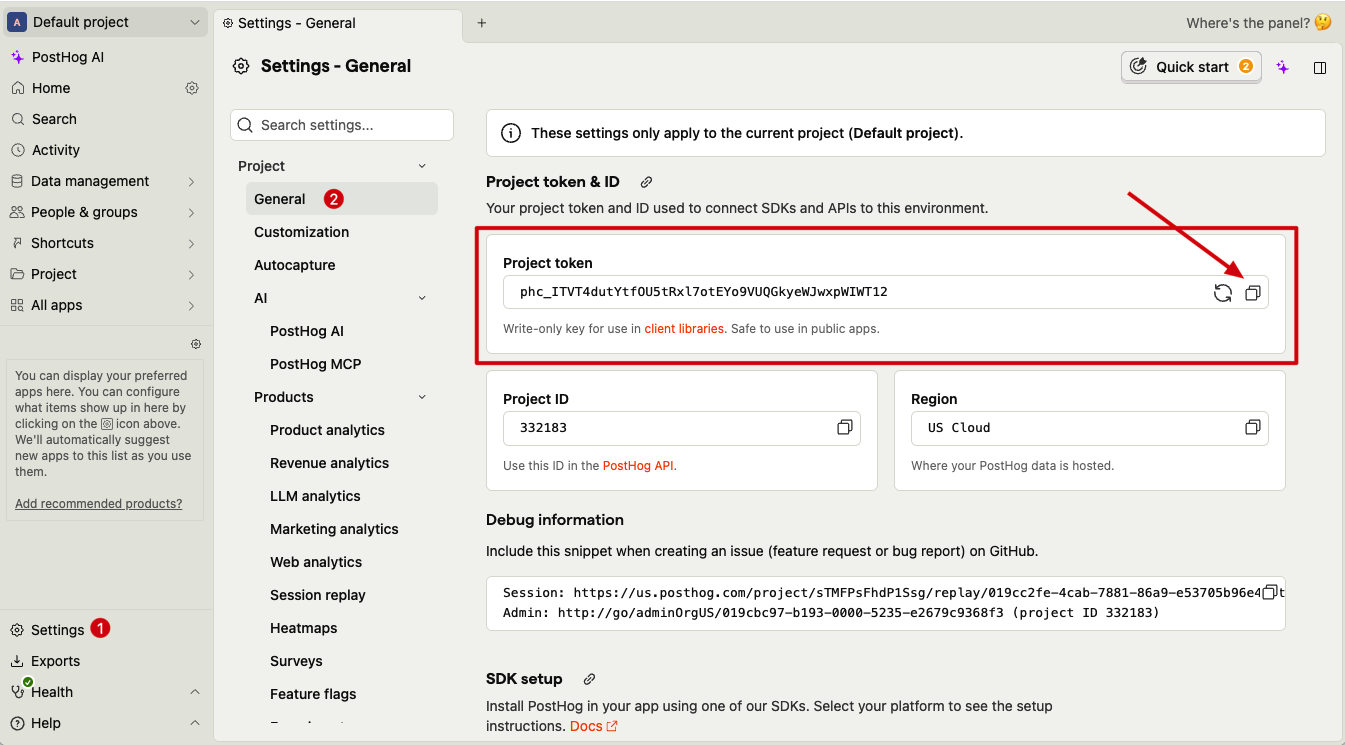
If your project is hosted in the EU region or self-hosted, also note your PostHog API URL (see Step 4 below).
Step 3 - Authentication
In Apphud, open Connections → Integrations (the All or Product Analytics tab). Click Add Connection for PostHog and choose a Source — iOS, Android, Flows, or Web-to-App (iOS).
Enter the PostHog Project Token (API Key) copied in Step 2 into the Project Token field.

API URL
Specify the PostHog API URL used for sending server-to-server events. If not provided, the default US Cloud URL https://us.i.posthog.com is used.
Configure the API URL if:
- Your PostHog project is hosted in the EU region — EU Cloud URL:
https://eu.i.posthog.com. - You use a self-hosted PostHog instance — enter your PostHog instance URL.
- You need to send events to a custom PostHog deployment.
Step 4 - Additional configuration

Send the user ID from your app as PostHog distinct_id
OFF by default. Turn it on to send your app's own user ID as distinct_id instead of Apphud's internal customer identifier. This keeps server-side subscription events attached to the same PostHog person as your app's client-side events — otherwise PostHog creates two separate Persons for the same paying user (one from your app, one from Apphud), splitting funnels at the purchase step and doubling unique-user counts.
This only merges correctly if you've completed Match user IDs — if your app's PostHog SDK isn't calling identify() with the same ID, turning this on just changes which value Apphud sends as distinct_id, without linking anything.
Skip the [Apphud] prefix for custom user properties
OFF by default. By default, custom user properties reach PostHog prefixed — [Apphud] <name> — so the same property has a different key depending on whether it came from your app's own SDK or from Apphud, and a single PostHog filter or cohort can't cover both. Turn this on to send custom properties under their original names.
Properties Apphud computes itself ([Apphud] total_spent, [Apphud] paying, [Apphud] status-{group}, etc. — see User Properties) always keep the [Apphud] prefix regardless of this setting.
Send events from anonymous users
OFF by default. Turn it on to also forward events from anonymous users — customers Apphud auto-created from an App Store or Google Play event before your SDK identified them (the SDK isn't integrated yet, or the app hasn't been updated). See the Integrations overview.
Environment
PostHog has no Sandbox mode for server-to-serverPostHog does not have a dedicated Sandbox mode for server-to-server integrations. If you send both Production and Sandbox events through the same connection, all of them end up in the same PostHog reports.
To keep test and live events separate, create a new PostHog project and configure a separate Apphud integration that sends only Sandbox events to it.
Revenue
PostHog-specific revenue option:
- Send Revenue Properties — when ON, Apphud sends product ID, purchase price, and currency to PostHog as event properties when available.
Generic Send sales as proceeds is described once on Integrations overview → Configuration tab.
Step 5 - Set up Filters (optional)
Navigate to Filters tab. Set up filters if needed as described on Integrations overview → Filters tab.
Step 6 - Set up Events list
Open the Events tab of the configuration. You can customize event names or disable specific events. See Events Cheat Sheet for the list of supported events and their properties.
Step 7 - Test connection (optional)
Save the connection.
To send a test event, click the Test connection button on the integration configuration page, enter an Event ID or Transaction ID, and click Send test event. If the configuration is accurate, you'll see a success message and integration logs.

Step 8 - Enable and save
Turn the integration on by switching the Enable integration control, and click Save.
Match user IDs
Initialize both SDKs and match Apphud's User ID to PostHog's distinct_id:
func application(_ application: UIApplication,
                 didFinishLaunchingWithOptions launchOptions: [UIApplication.LaunchOptionsKey: Any]?) -> Bool {

    Apphud.start(apiKey: "YOUR_API_KEY")
    Apphud.setDelegate(self)

    PostHogSDK.shared.setup(apiKey: "POSTHOG_API_KEY")
    PostHogSDK.shared.identify(Apphud.userID())

    return true
}

func apphudDidChangeUserID(_ userID: String) {
    PostHogSDK.shared.identify(userID)
}
Apphud.start(apiKey = "YOUR_API_KEY")
PostHog.setup(this, "POSTHOG_API_KEY")
PostHog.identify(Apphud.userID())Future<void> initPosthog() async {
final userId = await Apphud.userID();
await Posthog().identify(userId);
}
@override
Future<void> apphudDidChangeUserID(String userId) async {
await Posthog().identify(userId);
Events Cheat Sheet
Here is a list of events and their parameters sent to PostHog.
Trial
Trial period started
Default event name: [Apphud] trial_started
Revenue Parameters:
product_id: Stringunit: Stringunits_count: Integer
Successful conversion from trial period to regular subscription
Default event name: [Apphud] trial_converted
Revenue Parameters:
product_id: Stringlocal_price: Floatcurrency: Stringusd_price: Float
Cancellations
Trial Canceled
Default event name: [Apphud] trial_canceled
Revenue Parameters:
product_id: String
Subscription Canceled
Default event name: [Apphud] subscription_canceled
Revenue Parameters:
product_id: String
Regular
Subscription started
Default event name: [Apphud] subscription_started
Revenue Parameters:
product_id: Stringlocal_price: Floatcurrency: Stringusd_price: Float
Subscription renewed
Default event name: [Apphud] subscription_renewed
Revenue Parameters:
product_id: Stringlocal_price: Floatcurrency: Stringusd_price: Float
Subscription refunded
Default event name: [Apphud] subscription_refunded
Revenue Parameters:
product_id: Stringlocal_price: Floatcurrency: Stringusd_price: Float
Other Events
Non-renewing purchase
Default event name: [Apphud] non_renewing_purchase
Revenue Parameters:
product_id: Stringlocal_price: Floatcurrency: Stringusd_price: Float
Event Payload Structure (Apphud → PostHog)
Apphud sends subscription events to PostHog using a server-to-server JSON payload. Each event contains event metadata, user identifiers, event properties, and user profile updates.
Payload Overview
| Field | Description |
|---|---|
api_key | PostHog Project API key / Project token |
event | Event name, as configured in Apphud integration |
distinct_id | PostHog user identifier received as a result of matching |
timestamp | Event time (ISO 8601) |
platform | App platform (iOS / Android / Web) |
environment | App environment (production / sandbox) |
properties | Event parameters and user property updates |
Event Properties
Event-specific parameters are included inside the properties object. The exact set of properties depends on event type, platform, and integration configuration. These may include:
- Product information
- Revenue data (if configured to be included)
- Custom parameters
- Device and OS metadata
Optional properties are sent only when available. If a value does not exist for a given event, the property is not included in the payload.
User Properties
Apphud updates PostHog user profiles on each event using the $set object. This ensures user-level monetization and subscription status are always up to date.
Monetization Properties
| Property | Type | Description |
|---|---|---|
[Apphud] total_spent | Float | Total user spend |
[Apphud] paying | Boolean | Whether user is a paying customer |
[Apphud] payments_count | Integer | Number of successful payments |
Subscription Status by Product Group
Apphud sends subscription state separately for each product group. This allows analyzing subscriptions across multiple platforms, stores, and product lines.
| Property | Type | Description |
|---|---|---|
[Apphud] status-{group} | String | Subscription state (trial / regular / none) |
[Apphud] autorenew-{group} | Boolean | Auto-renew status |
NoteMore information about user properties can be found here.
Example Payload
{
  "api_key": "<POSTHOG_PROJECT_API_KEY>",
  "event": "[Apphud] subscription_renewed",
  "distinct_id": "66fbbd89-7c2b-45ff-aac3-de358b93c9a6",
  "timestamp": "2026-03-06T10:31:02.000Z",
  "platform": "iOS",
  "environment": "sandbox",
  "properties": {
    "$set": {
      "[Apphud] total_spent": 115.92,
      "[Apphud] paying": true,
      "[Apphud] payments_count": 8,
      "[Apphud] status-stripe": "regular",
      "[Apphud] autorenew-stripe": true
    }
  }
}
FAQ
When should I enable "Send the user ID from your app as PostHog distinct_id"?
Quick answer: enable it in the majority of cases — but there are exceptions worth checking first.
PostHog requires distinct_id to uniquely identify one person — whether Apphud's user_id satisfies that depends on your setup:
- App registered in Apphud after February 2024, and Apphud manages User IDs (you don't pass a custom User ID to the SDK) — enable it. Apphud's auto-generated User ID is guaranteed unique per user in this case, see Basic Initialization.
- iOS-only app registered before February 2024 — think twice first. For these legacy apps,
Device IDwas the primary identifier and User ID isn't guaranteed unique (see User Identification and Merging for Legacy iOS Apps). Turning this on could send a non-unique value asdistinct_id. - You pass your own custom User ID (your own user-management system) — uniqueness is on you to guarantee (see Custom User ID). If your IDs aren't actually unique per user, enabling this can split or wrongly merge the same person's events in PostHog.
All events show Pending for the PostHog integration. Why?
If Apphud hasn't received a PostHog User ID, events cannot be sent to PostHog. Ensure that the user-matching code is shipped in the current production app version. See Step 1 — Match User IDs.
Can I separate test and production data in PostHog?
Yes. Provide separate API keys (and corresponding integrations) for production and test PostHog projects. See Environment for why this is necessary.
Updated about 1 month ago