
Conversions Reports
Funnel-type cohort charts showing the progression from app install through trial, paid, intro, promo, non-renewing, and Flows conversion events.
Conversions Charts is a group of funnel-type cohort charts that show the progression of conversion events. Most conversion charts are anchored on users' First Seen Date (install) — see Cohorts for cohort mechanics.
Find Conversions Charts under Analytics → Reports → Conversions in the sidebar.
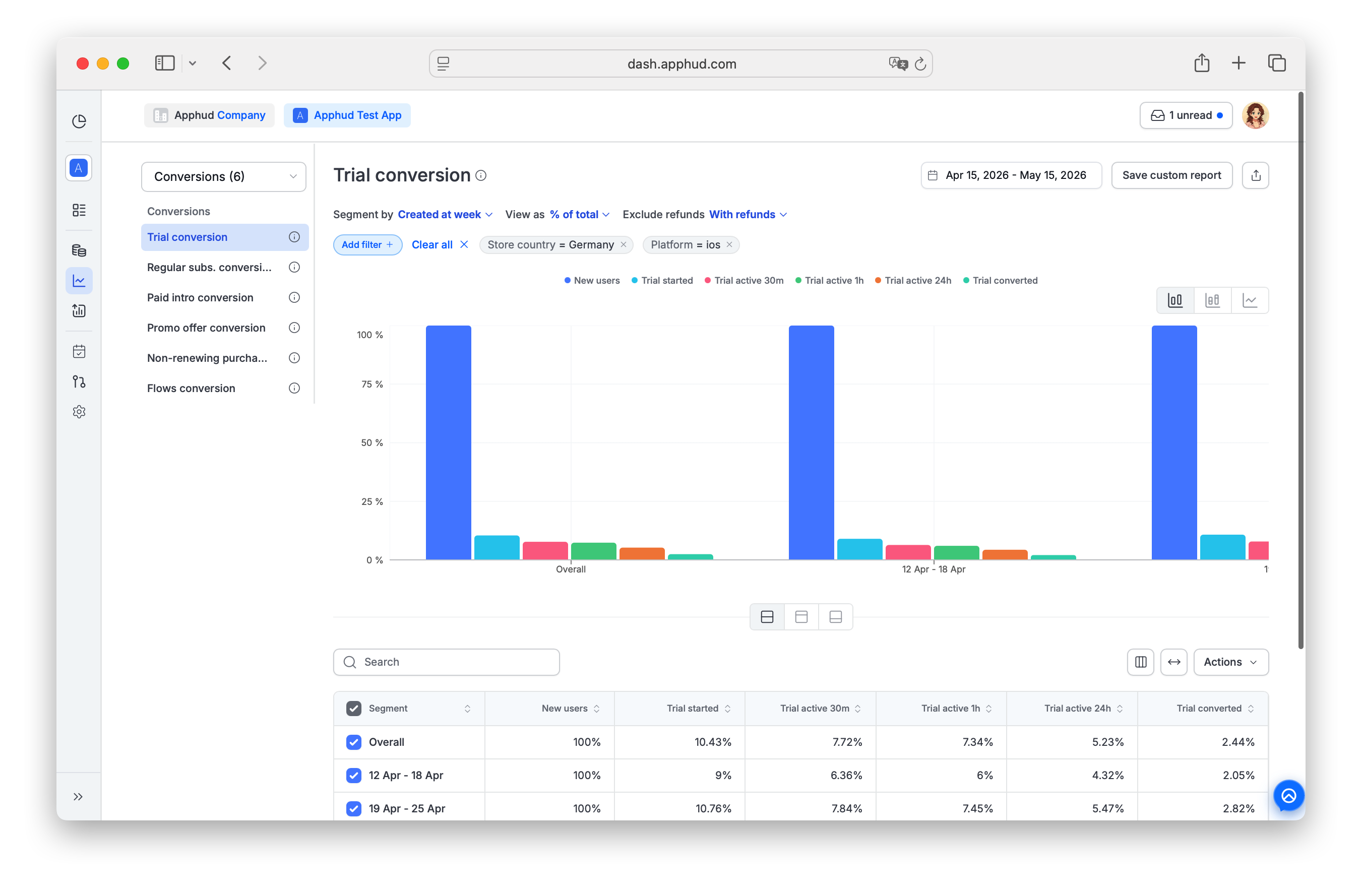
The group includes six charts:
- Trial conversion
- Regular subs. conversion
- Paid intro conversion
- Promo offer conversion
- Non-renewing purchases conversion
- Flows conversion
Unique by UsersAll conversion events are unique by user. If a user starts two trials simultaneously (for apps that allow it), they count as one trial starter. If a user converts two trials to paid, it counts as one trial-to-paid conversion.
Users who fully refunded their App Store / Google Play subscriptions are still counted in these report metrics.
How to read a row
If the chart row is dated January 28, it summarizes conversions for users who originally installed the app on January 28 — and then converted any day after the install (not necessarily on the 28th).
View as parameter
Switch how funnel values are displayed:
| Option | What it shows |
|---|---|
| % of total | Each column as a percentage of the first column (typically app installs) |
| % of previous | Each column as a percentage of the previous column. For Trial conversion, Trial converted % is based on Trial active 24h, not on Trial started |
| User count | Unique user count at each funnel step. In the Flows conversion chart this is replaced with Count — the number of times a Flow was initiated, since web-flow user identity isn't always reliable |
Exclude refunds parameter
Available on most conversion charts: excludes purchases that were later refunded from the funnel when Without refunds option is chosen, and includes those when With refunds is chosen.
Not available in Flows conversion chart.
Trial conversion
Measures the funnel: App Install → Free Trial → Trial Converted to Paid. Extra metrics specific to this chart:
- Trial active 30m — trials still active 30 minutes after start.
- Trial active 1h — trials still active 1 hour after start.
- Trial active 24h — trials still active 24 hours after start.
- Canceled after conversion — trials that converted to a paid subscription and then were canceled (auto-renew turned off), with no successful renewal in between, in the same billing cycle. A renewal that fails on its own and lapses without the user (or the store) ever turning auto-renew off doesn't count here — that ends in Subscription expired, not a cancellation.
When Exclude refunds is set to Without refunds, two metrics of this chart may change: Trial converted and Canceled after conversion. Trials whose conversion was later refunded are not counted in either of them.
These intermediate metrics let you measure trial-quality before the conversion outcome — a trial that lasts at least 1 hour passed the impulse-cancel filter (see also Trial Active event).
Regular subs. conversion
Measures the funnel: App Install → Subscription Started (at the regular price, no trial / intro / promo).
Paid intro conversion
Measures the funnel: App Install → Paid Intro Started → onward to Intro Converted.
Promo offer conversion
Measures the funnel: App Install → Promo Started → Promo Converted.
Non-renewing purchases conversion
Measures the funnel: App Install → Non-Renewing Purchase.
Flows conversion
Measures the funnel: Flow visit → Paywall view → web Purchase Action (any web purchase: trial start, subscription, or non-renewing).
Available for Apphud Flows. View-as Count (not User count), because web-flow visitor identity is unreliable. Exclude refunds is not available here.
Supported filters and segments
All conversion charts support standard segments and filters documented in Reports → Filters and segments.
Filter-only (not available as Segment by):
- Permission group — segment support is planned, currently filter only.
- Screen
- Experiment variations
FAQ
What's the difference between % of total and % of previous?
- % of total answers "what fraction of installs reached this step?" — comparable across cohorts.
- % of previous answers "given the prior step, what fraction continued?" — a step-conversion rate.
Use % of total for top-funnel ROI. Use % of previous for finding the weakest step.
Why does Trial Converted % use Trial active 24h, not Trial started?
Because raw trial-start counts include impulse buys that get refunded or canceled within hours. Trial active 24h filters those out, giving a cleaner "trials that actually had time to convert" denominator.
Are refunded purchases counted as conversions?
By default, yes — even fully refunded subscriptions count as conversions. Change Exclude refunds to filter them out by choosing Without refunds option.
Why is Flows conversion using Count instead of User count?
Because web-flow visits may not have stable user identifiers. Counting flow initiations gives a reliable funnel even when individual users can't be deduplicated.
Updated 11 days ago